
Adding to the Upcoming Questions List
How to Find the Upcoming Questions List
Sign in to Storii
Click on the profile of the person recording their life story (left side menu)
Click on the Upcoming Questions button

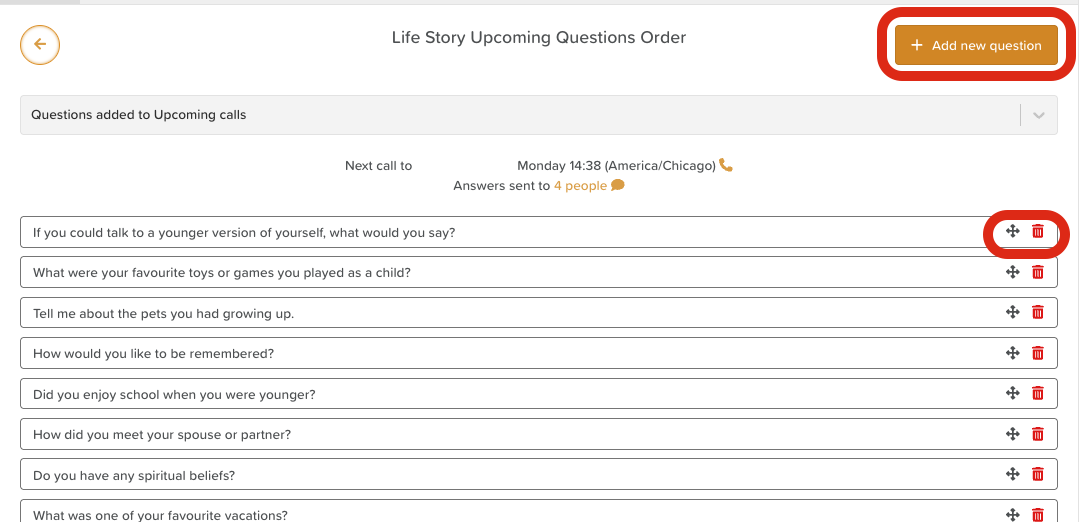
Here, you'll see a list of questions that are queued up and ready to be asked over the phone to the call recipient.
From here, users can:
Delete unwanted questions by clicking the red trash bin icon
Reorder questions by clicking on the cross arrows and dragging/dropping the question to a different location (updates automatically, no need to save changes)
Add new questions by clicking the +Add new question button
How to Add to the Upcoming Questions List
Questions can be added to the call queue in two ways:
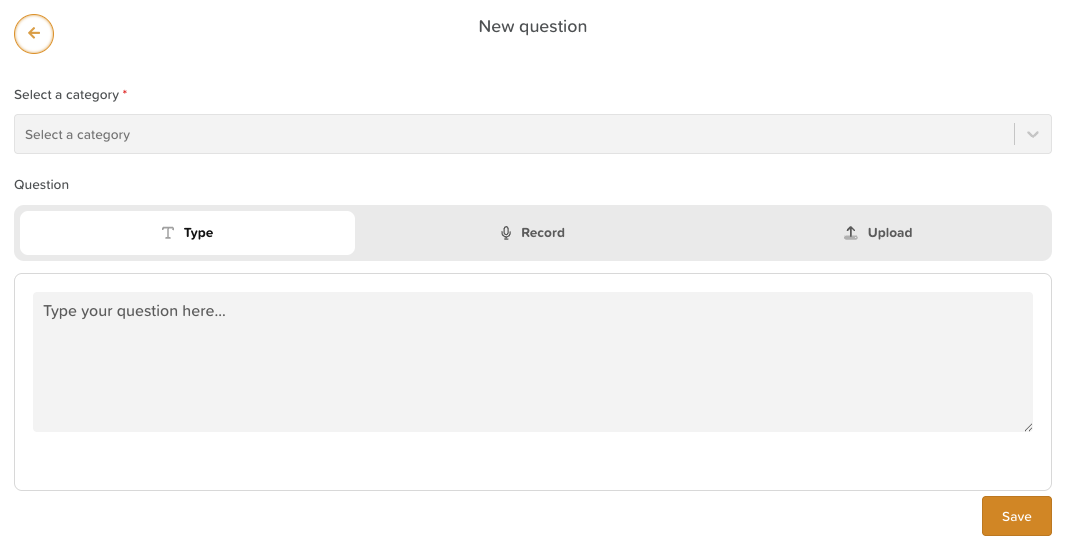
Add custom questions directly from the Upcoming Questions page (as seen above)
Select a category
Choose from the following options: Type the question, record yourself asking the question directly in Storii, or upload an audio file from your device.
Save
Add questions from the Life Story Categories & Sub Categories
From the storyteller's profile, click on a Life Story Category and Subcategory

Click on any question you want to add
Click on the Add to Upcoming Questions button